
how it works.
See how Keocam works, step by step.
clip on. get eyes on
A light weight and versatile design
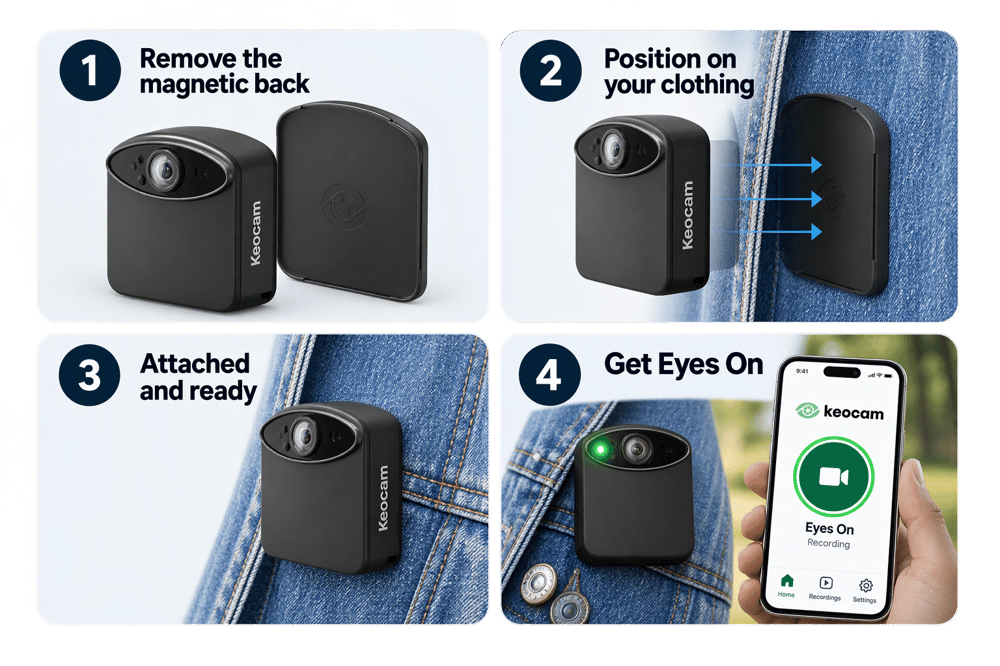
Keocam’s removable magnetic back lets you attach it quickly to suitable clothing or a strap. Once it’s in place, turn on Keocam and connect your phone via the mobile app. In a few seconds "You're Eyes On, Let's Go!"
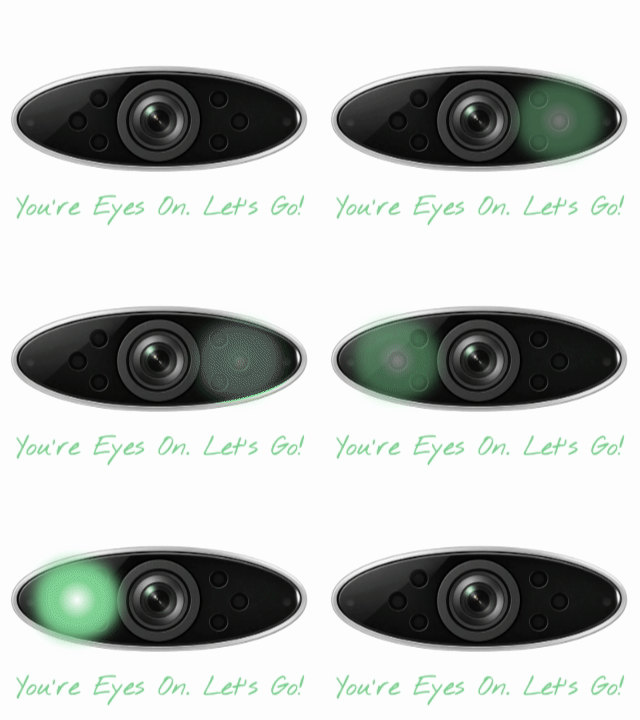
Green lights flash alternately, to show bystanders that Keocam is active and recording in a loop.
You're Eyes On, Let's Go!
2 main modes of operation.
1. eyes on mode.
2. emergency mode.
eyes on mode.
the time machine.
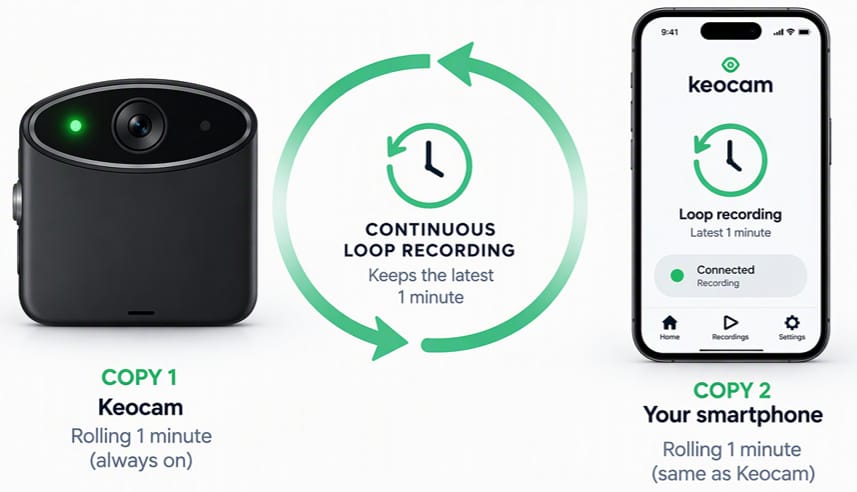
Loop recording. Two copies. Always ready.
As soon as you connect Keocam with your Smartphone you enter "Eye's On" mode, Keocam will tell you "You're Eyes On, Let's Go!"
- Loop recording: Keocam stores the previous 1 minute in its memory
- Two copies: Keocam shares a copy of that recording with your smartphone. So you hvae 2 copies at all times.
- Always ready: Keocam and your smartphone are in constant communication. Checking connection etc. If anything is not right Keocam will tell you.
In "Eye's On" Mode nothing older than 1 minute is retained in the memory or sent to the cloud.
Any bystanders concerned about being recorded will be "forgotten" after 1 minute. If you are left alone, all will be forgotten. But if you need to act....that's very different.
eyes on mode.
the time machine.
Loop recording. Two copies. Always ready.
As soon as you connect Keocam with your Smartphone you enter "Eye's On" mode, Keocam will tell you "You're Eyes On, Let's Go!"
- Loop recording: Keocam stores the previous 1 minute in its memory
- Two copies: Keocam shares a copy of that recording with your smartphone. So you hvae 2 copies at all times.
- Always ready: Keocam and your smartphone are in constant communication. Checking connection etc. If anything is not right, Keocam will tell you.
In "Eye's On" Mode nothing older than 1 minute is retained in the memory or sent to the cloud.
Any bystanders concerned about being recorded will be "forgotten" after 1 minute. If you are left alone, all will be forgotten. But if you need to act....that's very different.
emergency mode.
act when you need it.
Three different ways to activate Emergency Mode
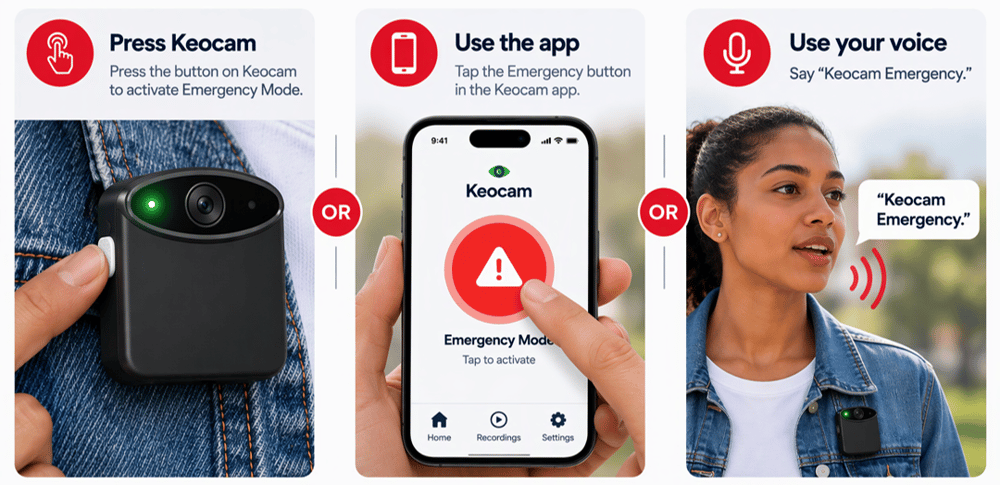
If you are feeling threatened you can activate an emergency mode in one of three different ways.
emergency mode.
act when you need it.
Three different ways to activate Emergency Mode
If you are feeling threatened you can activate an emergency mode in one of three different ways.
3 ways to activate an emergency
what is emergency mode?
Lock down the past.
Continue recording.
Save everything to the cloud.
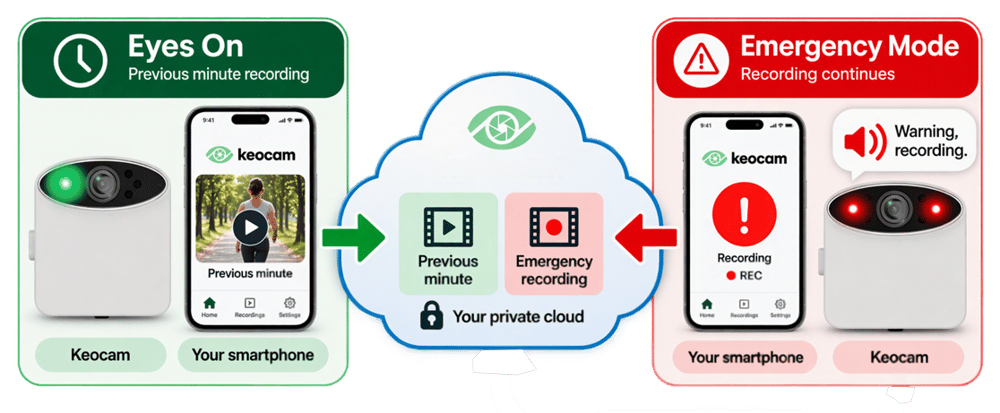
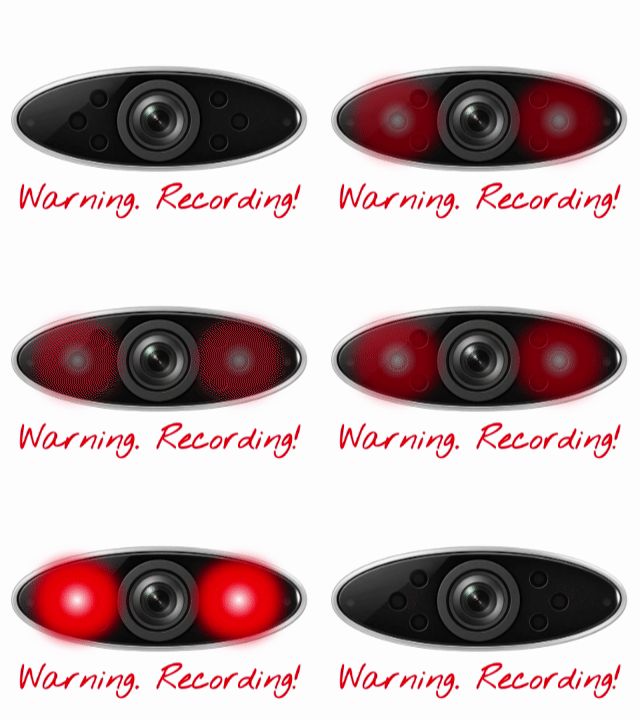
Emergency mode Keocam's lights turn to red, and issues an audible warning, making it clear that Emergency Mode is active.
- Locks down the previous 1 minute: The loop recording is saved to the memory of Keocam AND your smartphone
- Send recordings to the cloud: Your Smartphone sends the previous 1 minute recording to your private cloud account. You now have context of what happened before.
- Continue recording: Keocam continues to record and send that recording to your private cloud account via your smartphone connection.
- Save to memory: Copies are kept in the memory of both Keocam and the Smartphone until its safe in the cloud.
- App locked: The only way to stop an Emergency mode is via your smartphone app using a password you choose during set up.
what is emergency mode?
Lock down the past.
Continue recording.
Save everything to the cloud
Emergency mode Keocam's lights turn to red, and issues an audible warning, making it clear that Emergency Mode is active.
- Locks down the previous 1 minute: The loop recording is saved to the memory of Keocam AND your smartphone
- Send recordings to the cloud: Your Smartphone sends the previous 1 minute recording to your private cloud account. You now have context of what happened before.
- Continue recording: Keocam continues to record and send that recording to your private cloud account via your smartphone connection.
- Save to Memory: Back up copies are kept in the memory of both Keocam and the Smartphone until its safe in the cloud.
- App locked: The only way to stop an Emergency mode is via your smartphone app using a password you choose during set up.
friends and family alerted.
The people you trust know when something is wrong.
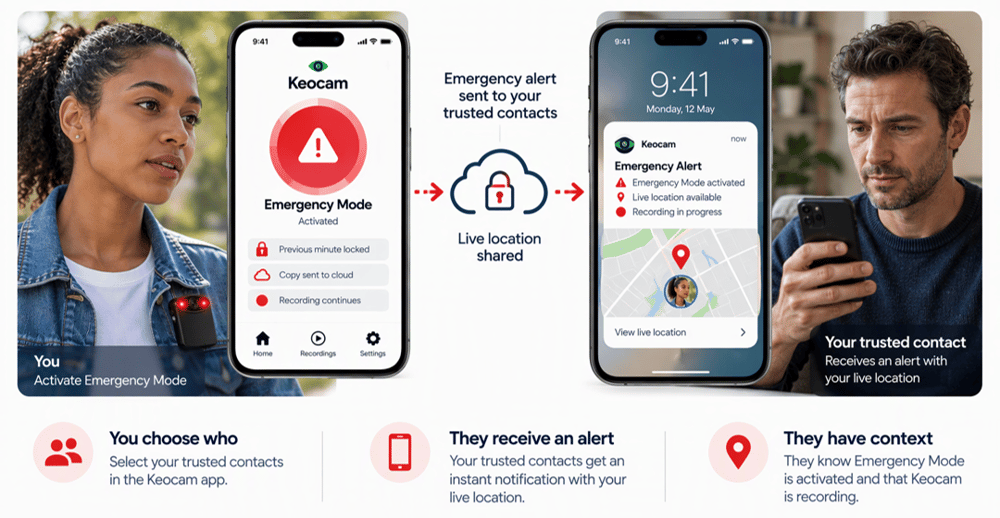
When Emergency Mode is activated, your selected trusted contacts are alerted. They receive your live location and recording reference number, so they know an emergency recording exists.
If you’re unable to respond, they can give the reference number to the authorities, who can request access to the recording through the appropriate process.
friends and family alerted.
The people you trust know when something is wrong.
When Emergency Mode is activated, your selected trusted contacts are alerted. They receive your live location and recording reference number, so they know an emergency recording exists.
If you’re unable to respond, they can give the reference number to the authorities, who can request access to the recording through the appropriate process.
what if someone takes keocam?
Taking the camera does not take the evidence.
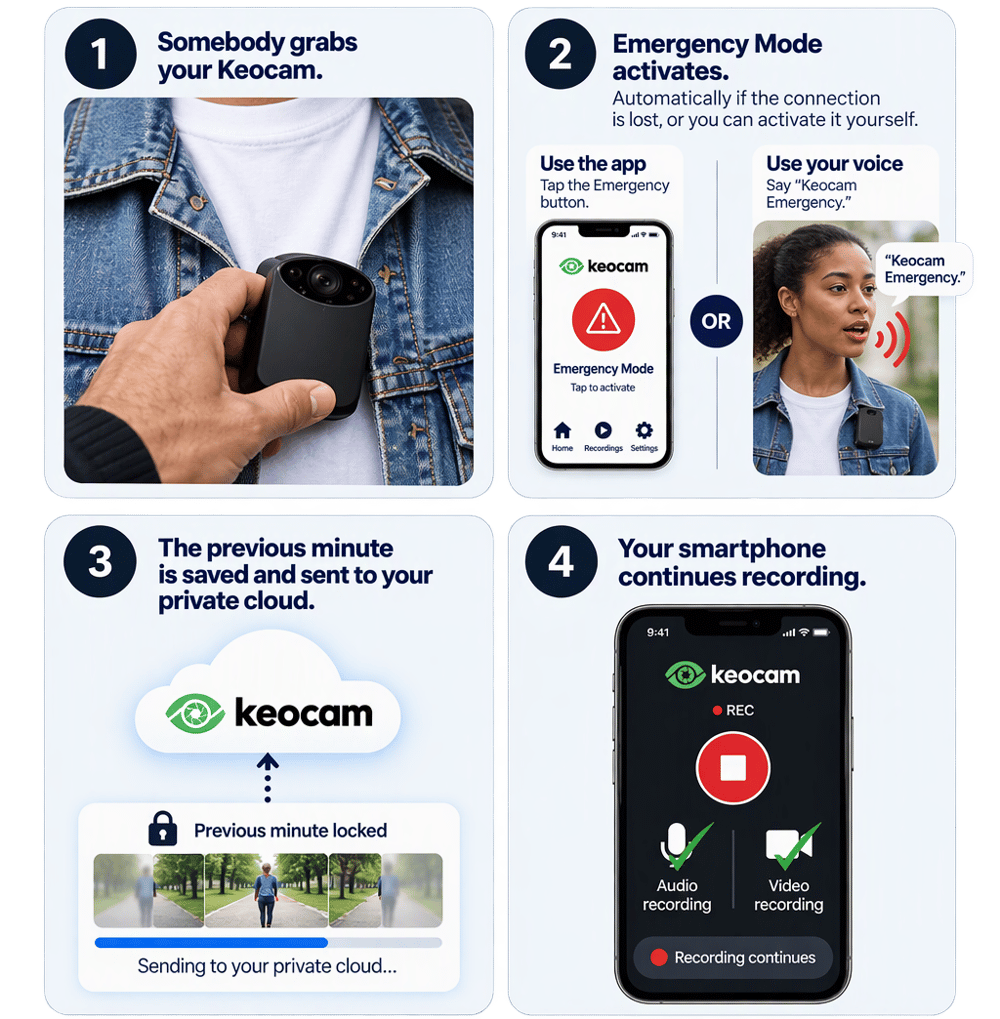
Keocam and your smartphone continually monitor their connection. If the connection is lost without being properly disconnected through the system, Emergency Mode activates automatically.
The previous minute is locked and sent to your private cloud, and your smartphone starts recording audio and video.
You can also activate Emergency Mode yourself through the app or, while Keocam is still connected and within range, by saying “Keocam Emergency.”
what if someone takes keocam?
Taking the camera does not take the evidence.
Keocam and your smartphone continually monitor their connection. If the connection is lost without being properly disconnected through the system, Emergency Mode activates automatically.
The previous minute is locked and sent to your private cloud, and your smartphone starts recording audio and video.
You can also activate Emergency Mode yourself through the app or, while Keocam is still connected and within range, by saying “Keocam Emergency.”
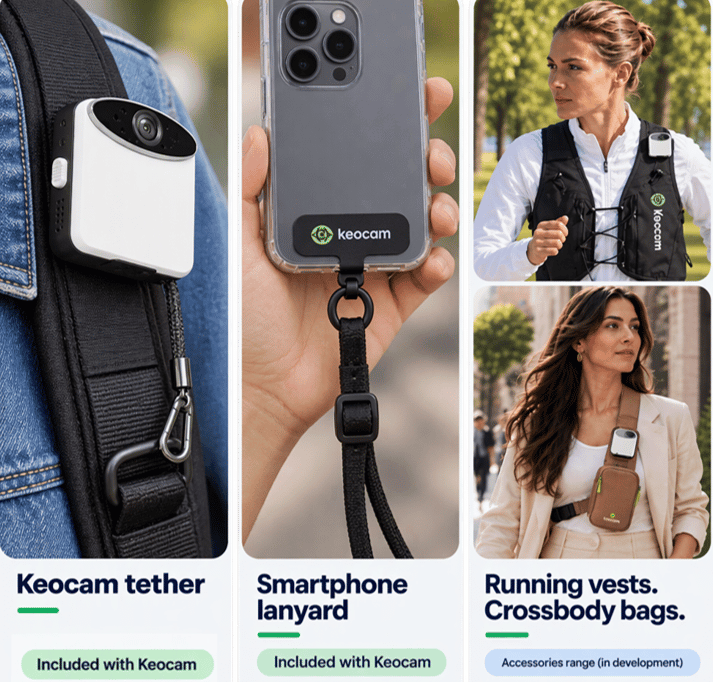
keep keocam and your smartphone attached to you.
Accessories in box and in our store.
Keocam comes with a small safety tether that can be secured to a suitable bag, strap or item of clothing. We also include a crossbody smartphone lanyard with an insert that fits inside a suitable phone case, helping keep your smartphone physically attached to you.
For even greater convenience, we're developing accessories including running vests and crossbody bags with dedicated pockets and tethering points for both Keocam and your smartphone, helping keep the complete system secure, accessible and connected.
keep keocam & your smartphone attached.
Accessories in box and in our store.
Keocam comes with a small safety tether that can be secured to a suitable bag, strap or item of clothing. We also include a crossbody smartphone lanyard with an insert that fits inside a suitable phone case, helping keep your smartphone physically attached to you.
For even greater convenience, we're developing accessories including running vests and crossbody bags with dedicated pockets and tethering points for both Keocam and your smartphone, helping keep the complete system secure, accessible and connected.
your recording. your decision.
Evidence = Consequences
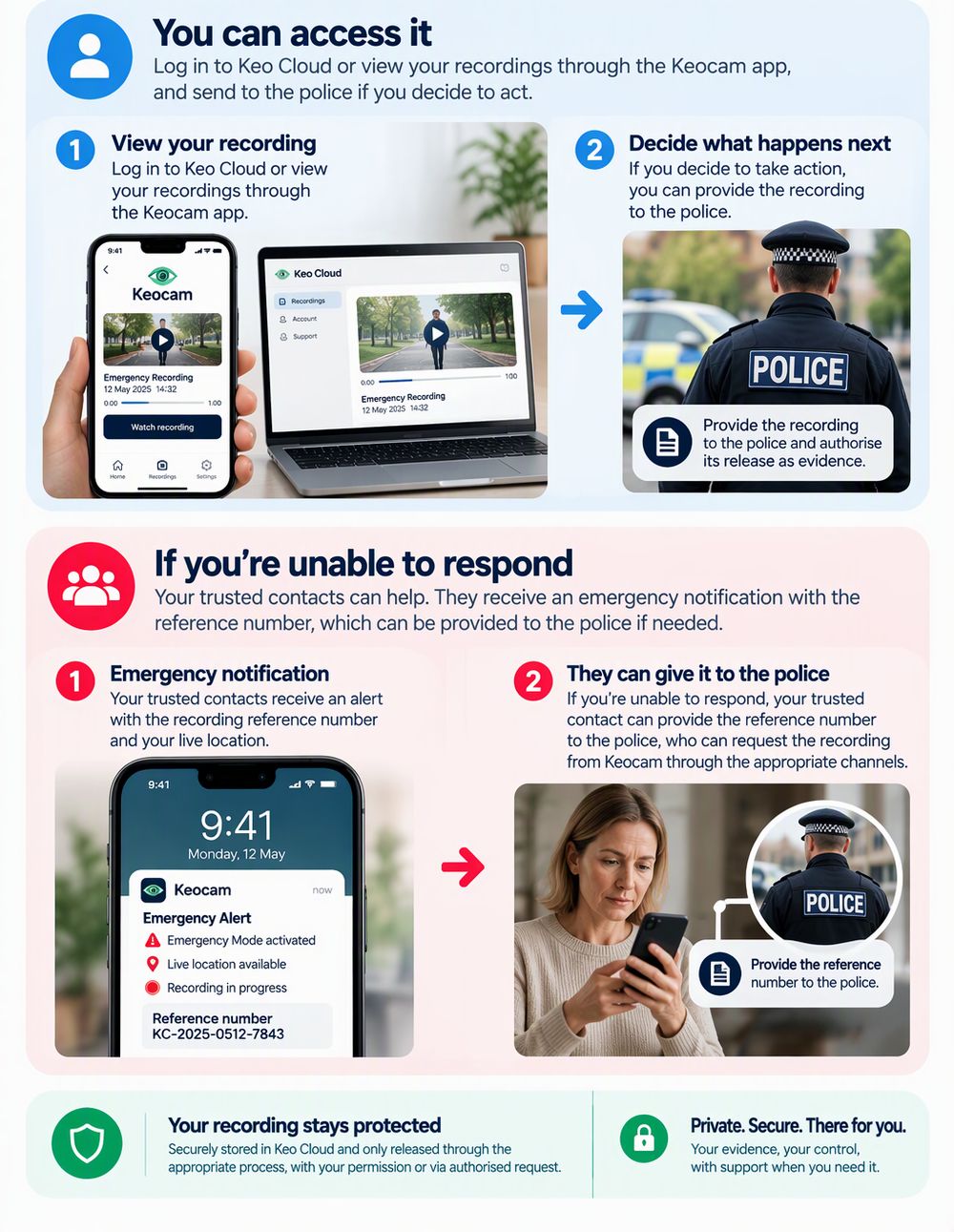
Your Keo Cloud recording is available for you to review. If you decide to take action, you can provide the recording to the police and authorise its release through the appropriate legal process. If you’re unable to access it yourself, your trusted contacts have the recording reference number, which can be provided to the authorities so they can request access from Keocam through the appropriate channels.
your recording. your decision.
Evidence = Consequences
Your KeoCloud recording is available for you to review. If you decide to take action, you can provide the recording to the police and authorise its release through the appropriate legal process. If you’re unable to access it yourself, your trusted contacts have the recording reference number, which can be provided to the authorities so they can request access from Keocam through the appropriate channels.
evidence stays evidence.
Recorded for accountability. Protected by design.
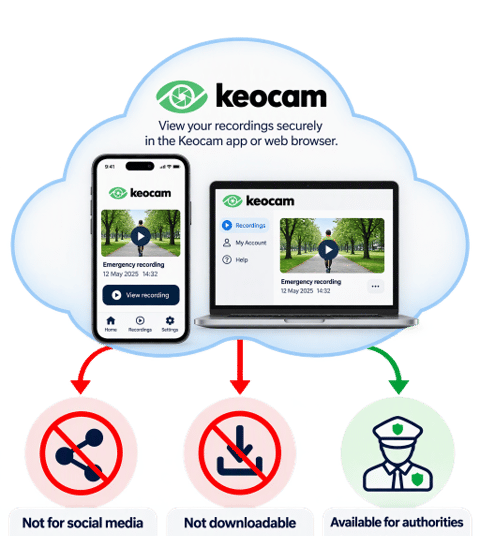
Your recording is there to protect you, not to become content. View it securely through the Keocam app, while the original remains protected in Keo Cloud. By preventing ordinary downloads, Keocam helps protect the recording from alteration and discourages sensitive footage being posted publicly. If it is needed as evidence, it can be shared with the police through the appropriate process.
evidence stays evidence.
Recorded for accountability. Protected by design.
Your recording is there to protect you, not to become content. View it securely through the Keocam app, while the original remains protected in Keo Cloud. By preventing ordinary downloads, Keocam helps protect the recording from alteration and discourages sensitive footage being posted publicly. If it is needed as evidence, it can be shared with the police through the appropriate process.